> For the complete documentation index, see [llms.txt](https://docs.monogoto.io/llms.txt). Markdown versions of documentation pages are available by appending `.md` to page URLs; this page is available as [Markdown](https://docs.monogoto.io/private-networks/cpe-and-ue/ipc-scb800-cbrs-camera.md).
# IPC SCB800 CBRS Camera
Easy to install SCB800 CBRS Camera
The Smawave SBC800 Camera is an LTE device that provides access to (private) LTE networks. It allows users to access the shared spectrum of the CBRS using LTE technology.
The SBC800 Camera supports **5G/4G LTE bands**.
IPC SCB800
### Prerequisites
* Monogoto SIM
* IPC SCB800 Camera
* Access to a private LTE network
## Connect the IPC SCB800 Camera
Start by inserting the Monogoto SIM into the IPC SCB800 Camera.
Connect the IPC SCB800 Camera to your PC using the Eth port.
Open up a browser and visit the URL: [**192.168.1.168**](http://192.168.0.1/)**.**
Enter the user name and password and click Login. The default credentials are:\
Username: **admin** \
Password: **admin**
{% hint style="warning" %}
Make sure to change the password after your first login.
{% endhint %}
## APN Configuration
Open up the page **Remote Setting > 5G >5G APN Config**.
Configure the APN to: **`data.mono`**
## Band Configuration
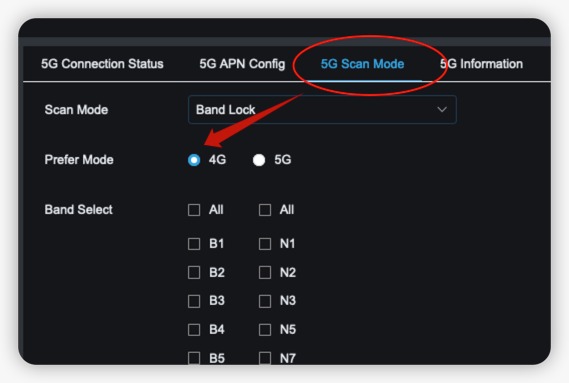
Open up the page **Remote Setting > 5G >5G Scan Mode**
Configure the Scan Mode to: **`Band Lock`****B48 (CBRS)**
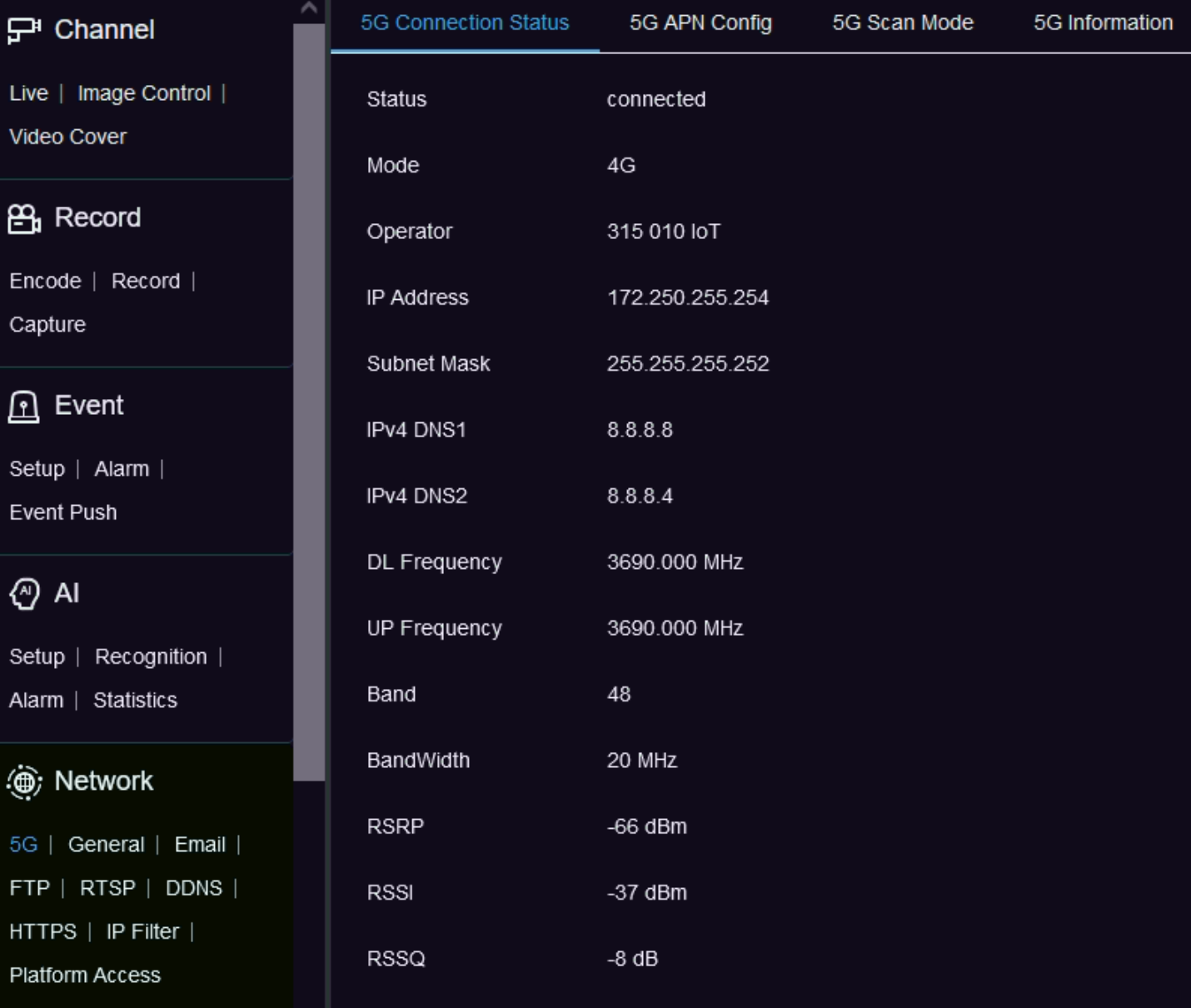
## Review the connection status
Visit the **Remote Setting > 5G >5G Connection Status** page to validate the connection with Monogoto's private network. If the connection was successfully established, the LTE Status reports: **Connected**. The Operator shows: **315010 iOT**
## Useful Links
* [SCB800 Specifications](https://files.gitbook.com/v0/b/gitbook-x-prod.appspot.com/o/spaces%2F-M0mPxGpottOEfcucXOR%2Fuploads%2FxSVFCFmWWupNqv2ZANSm%2FSCB800%20Specifications.pdf?alt=media\&token=61d5f831-e3a3-4f9b-904a-69f7a013b646)
* [SCB80](https://files.gitbook.com/v0/b/gitbook-x-prod.appspot.com/o/spaces%2F-M0mPxGpottOEfcucXOR%2Fuploads%2FivUtzVdipDtojprg79uD%2FSmawave_SCB800%20Quick%20Installation%20Guide%20V1.2.pdf?alt=media\&token=3bdc7148-6a72-4dd0-b410-9ad46471122d)[0 User Manual (v1.0)](https://files.gitbook.com/v0/b/gitbook-x-prod.appspot.com/o/spaces%2F-M0mPxGpottOEfcucXOR%2Fuploads%2Frc1ehNBXHJKgCugNWk0P%2FSmawave_IPC-User%20Manual-SCB800_V1.0_2023.pdf?alt=media\&token=c95166f1-3610-4db1-8628-99d6c39e779f)
* [SCB800 Quick Installation Guide](https://files.gitbook.com/v0/b/gitbook-x-prod.appspot.com/o/spaces%2F-M0mPxGpottOEfcucXOR%2Fuploads%2FivUtzVdipDtojprg79uD%2FSmawave_SCB800%20Quick%20Installation%20Guide%20V1.2.pdf?alt=media\&token=3bdc7148-6a72-4dd0-b410-9ad46471122d)