> For the complete documentation index, see [llms.txt](https://docs.monogoto.io/llms.txt). Markdown versions of documentation pages are available by appending `.md` to page URLs; this page is available as [Markdown](https://docs.monogoto.io/private-networks/cpe-and-ue/sierra-wireless-em7565.md).
# Sierra Wireless EM7565
Get started with the Sierra Wireless EM7565
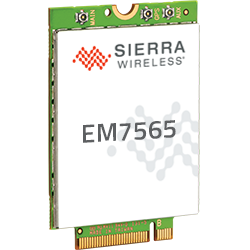
The Sierra Wireless EM7565 mini PCIe (mPCIe) supports 4G LTE Advanced Pro Cat-12 global connectivity with 3G fallback. The modem is designed for Europe and North America and is perfectly suited for private LTE networks as it supports band 48, also referred to as CBRS.
* **4G** bands: B1 (FDD 2100),B2 (FDD 1900),B3 (FDD 1800),B4 (FDD 1700 / AWS),B5 (FDD 850),B7 (FDD 2600), B8 (FDD 900),B9 (FDD 1800),B12 (FDD 700ac),B13 (FDD 700c),B18 (FDD 800),B19 (FDD 800),B20 (FDD 800DD),B26 (FDD 850),B28 (FDD 700),B29 (SDL 700),B30 (FDD 2300),B32 (SDL 1500),B41 (TDD 2500),B42 (TDD 3500),B43 (TDD 3600),B46 (TDD 5200),B48 (TDD 3600),B66 (FDD 1700 / AWS-3)
* **3G** bands: B1 (2100),B2 (1900),B19 (800),B8 (900),B4 (AWS),B5 (850),B6 (800),B9 (1700)
### Prerequisites
* Monogoto SIM
* Sierra Wireless EM7565 mini PCIE
* An adapter to connect to the EM7565, possibly a USB dongle or AirPrime MC Series Dev Kit
### Quick Navigation
* [Getting Started](#getting-started)
* [Connect the EM7565 to Monogoto](#connect-the-mc7700-to-monogoto)
* [Useful Links](#useful-links)
## Getting Started
Start by connecting the **LTE antenna**
Add the **Monogoto SIM**
**Power up** the LTE modem
**Connect your computer to the modem**\
You may use a terminal program on your PC to configure the EM7565. You can use PuTTY for Windows, or screen, minicom, or coolterm / miniterm for Mac or Linux.
{% hint style="info" %}
**For Windows users.** You need to install a driver to start using the EM7565. You can download the driver [**here**](https://source.sierrawireless.com/resources/airprime/software/airprime_wpx5xx_wp76xx_wp77xx_at_command_reference/#sthash.iz8dE3dv.dpbs).
{% endhint %}
## Connect the EM7565 to Monogoto
{% hint style="info" %}
Keep the **AT Commands manual** next to you for more details about the commands. [**Click here**](https://source.sierrawireless.com/resources/airprime/minicard/2130617_ac_ap_umts_supported_at_command_reference/) to download the latest version.
{% endhint %}
**Reset the modem** to its default configuration:
```bash
AT+CFUN=1,1
```
Set the error reporting to **verbose**, resulting in more descriptive error messages (optional):
```bash
AT+CMEE=2
```
Check the status of the SIM card. The correct response should be: `+CPIN: READY`
```
AT+CPIN?
```
{% hint style="warning" %}
If you receive an error, the SIM may not be inserted properly or the SIM is protected with a PIN. By default, Monogoto SIMs are not PIN-protected.
{% endhint %}
### Query device information
Request the **product type, hardware,** and **firmware** **version**:
```bash
ATI
```
Request the **IMSI** (International Mobile Subscriber Identity):
```
AT+CIMI
```
Request the **ICCID** (Integrated Circuit Card ID), which is the identification number of the SIM card
```bash
AT+ICCID
```
### Network Configuration
It is possible to let the modem select the network automatically or to manually define a network to connect with.
#### **Option 1: Automatic Network Selection**
To set the modem to **automatic network selection** enter the command:
```bash
AT+COPS=0
```
Check the **network and cellular technology the modem** is currently using:
```
AT+COPS?
```
Expected response: `+COPS: 0,0,"",X`. The last digit indicates the cellular technology:
`2` indicates **3G**\
`7` indicates **4G**
#### Option 2: Manual Network Selection
Start with searching for available networks:
```
AT+COPS=?
```
{% hint style="warning" %}
It may take several minutes before the modem responds.
{% endhint %}
The modem responds with the **names** and the **MCCMNC** codes of the available networks. It also shows the cellular technologies the networks support:
```
+COPS: (1,"T-Mobile NL","TMO NL","20416",0),(1,"NL KPN","NL KPN","20408",0),(1,"vodafone NL","voda NL","20404",0),(2,"NL KPN","NL KPN","20408",7),(1,"vodafone NL","voda NL","20404",7),(1,"T-Mobile NL","TMO NL","20416",7),,(0,1,2,3,4),(0,)
OK
```
To find which of the networks Monogoto has **roaming agreements** with, review the [**Coverage lists**](/getting-started/global-public-coverage.md).
{% hint style="info" %}
To find the **profile** of your SIM, visit the [**Monogoto Console**](https://console.monogoto.io/), open the page **Things**  and select a specific **Thing**. Scroll down to **Mobile Identities** to find your profile in the column **Network Provider Name**.

{% endhint %}
Check the **network and cellular technology** the modem is currently using:
```
AT+COPS?
```
Expected response: `+COPS: 0,0,"",X`. The last digit indicates the cellular technology.
**Manually set the network and the cellular technology**:
Monogoto's private LTE network is indicated with the **MCCMNC** code: `315010`. To connect to the private LTE network, enter:
```
AT+COPS=1,2,"315010",7
```
Replace `XXXXX` with the **MCCMNC** code of your operator, for example`"315010"` for Monogoto private LTE. Use `7` for LTE. It is possible to leave the value for setting the cellular technology out, allowing the modem to select the RAT by itself.
**Check the radio signal strength and signal quality:**
```bash
AT+CSQ
```
{% hint style="info" %}
`+CSQ` returns 2 values separated by a comma. The first value represents the **signal strength** and provides a value between 0 and 31; higher numbers indicate better signal strength. The second value represents the **signal quality** indicated by a value between 0 and 7. If `AT+CSQ` returns `99,99`, the signal is undetectable or unknown.
{% endhint %}
#### Define the cellular band(s) (optional)
It is possible to **lock the modem to specific bands for specific technologies**. This may result in a faster boot cycle as the modem does not need to scan for available bands at startup.
To read the available options, enter:
```
AT!BAND=?
```
Expected response:
```
Index, Name
00, All bands
01, Europe 3G
02, North America 3G
06, Europe
07, North America
08, WCDMA ALL
09, LTE ALL
```
To lock the modem to European bands, enter:
```
AT!BAND=06
```
#### Query Network information
Return the operational status, including the Radio Access Technology (RAT) and the band used:
```
AT!GSTATUS?
```
Example response:
```
!GSTATUS:
Current Time: 2196 Temperature: 30
Reset Counter: 1 Mode: ONLINE
System mode: LTE PS state: Attached
LTE band: B48 LTE bw: 20 MHz
LTE Rx chan: 55340 LTE Tx chan: 55340
LTE SCC1 state:NOT ASSIGNED
LTE SCC2 state:NOT ASSIGNED
LTE SCC3 state:NOT ASSIGNED
LTE SCC4 state:NOT ASSIGNED
EMM state: Registered Normal Service
RRC state: RRC Connected
IMS reg state: No Srv
PCC RxM RSSI: -89 PCC RxM RSRP: -117
PCC RxD RSSI: -95 PCC RxD RSRP: -140
Tx Power: -- TAC: 0001 (1)
RSRQ (dB): -8.1 Cell ID: 04146615 (68445717)
SINR (dB): 6.8
```
### Network Activation
**Set the APN to** `data.mono`:
```json
AT+CGDCONT=1,"IP","data.mono"
```
Validate if the **APN** is set correctly:
```
AT+CGDCONT?
```
Expected response: `+CGDCONT: 1,"IP","data.mono","0.0.0.0",0,0,0,0,0,0`
**Activate the PDP (packet data protocol) context**:
```
AT+CGACT=1,1
```
**Test** if the PDP context is activated:
```
AT+CGACT?
```
Expected response: `+CGACT: 1,1`
#### Validate if your device received an **IP address**:
```bash
AT+CGPADDR
```
Expected response: `+CGPADDR: 1,XX.XXX.XX.XXX`
{% hint style="success" %}
Do you see an IP address? **Congratulations! You’ve successfully connected the Sierra Wireless modem to Monogoto 🎉**
Have a look at the **Things** logs in the [**Monogoto Console**](https://console.monogoto.io/) to find more details about the established connection.
{% endhint %}
## Useful Links
* [AT Commands Manual](https://source.sierrawireless.com/resources/airprime/minicard/75xx/41111748-airprime-em75xx-at-command-reference/#sthash.YF8AfA98.dpbs)
* [M7565 Product Page](https://source.sierrawireless.com/devices/em-series/em7565/#sthash.Z5VUD0Td.Asp9AAks.dpbs)
* [Download Windows driver](https://source.sierrawireless.com/resources/airprime/software/airprime-em_mc-series-windows-drivers-qmi-build-latest-release/#sthash.FPEF7bcB.dpbs)