> For the complete documentation index, see [llms.txt](https://docs.monogoto.io/llms.txt). Markdown versions of documentation pages are available by appending `.md` to page URLs; this page is available as [Markdown](https://docs.monogoto.io/private-networks/cpe-and-ue/dg10-cbrs-usb-dongle.md).
# DG10 CBRS USB Dongle
Easy to install CBRS device
The Horizon DG10 is an LTE device that provides access to (private) LTE networks. It allows users to access the shared-spectrum of the CBRS using LTE technology.
The DG10 supports **LTE band 41 and band 48 (CBRS)** using **LTE Category 6** with up to 220Mbps downlink and 30Mbps uplink.
### Prerequisites
* Monogoto SIM
* DG10 CBRS USB Dongle
* Access to a private LTE network
## Connect the DG10
Start by inserting the Monogoto SIM to the DG10.
Connect the USB dongle to your PC using the USB port.
Open up a browser and visit the url: [**192.168.0.1**](http://192.168.0.1/)**.**

Enter the user name and password and click Login. The default credentials are:\
Username: **admin** / **superadmin** \
Password: **admin**
{% hint style="warning" %}
Make sure to change the password after your first login.
{% endhint %}
## APN Configuration
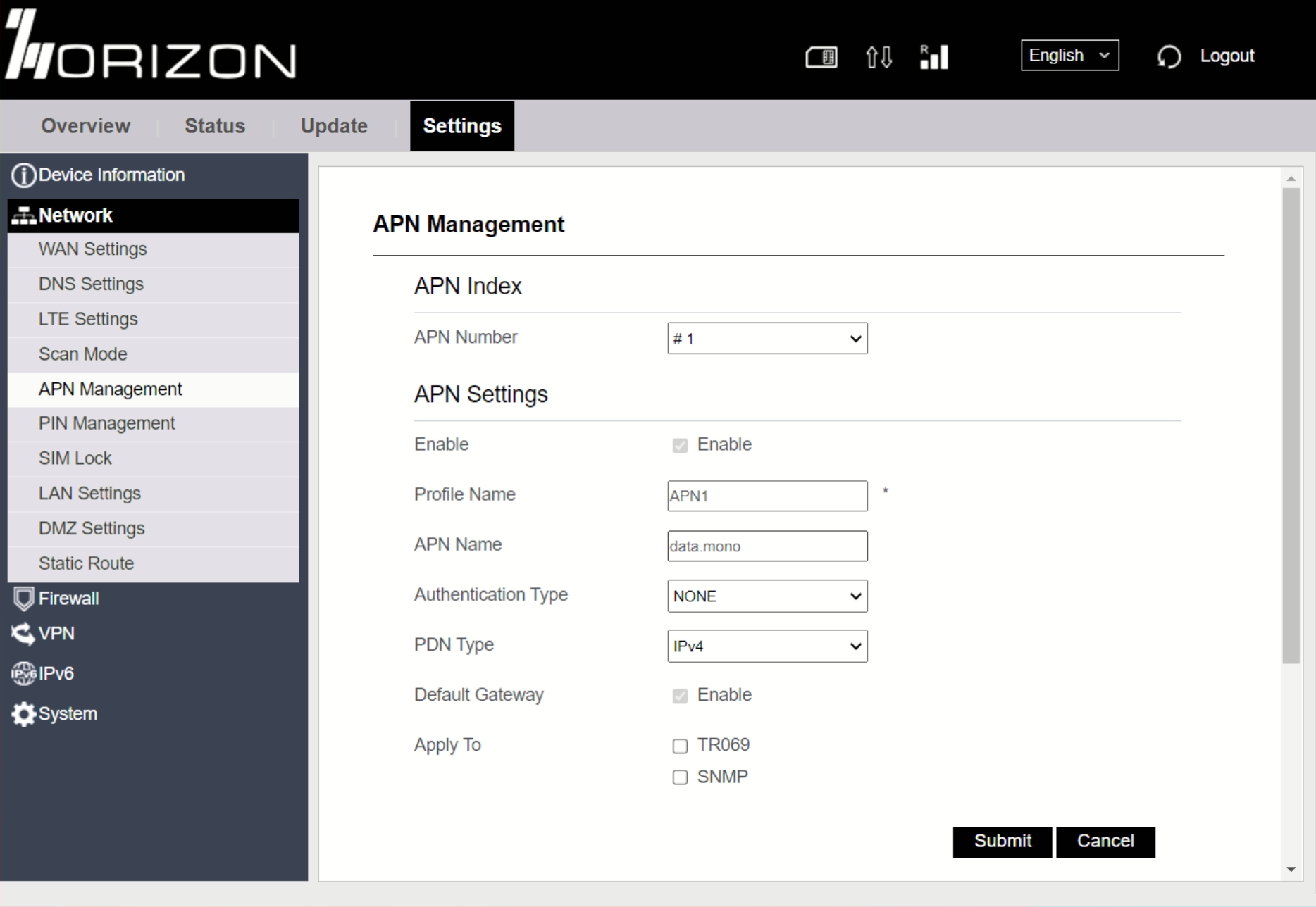
Open up the page **Network > APN Management**.
Configure the APN to: **`data.mono`**
## Review the connection status
Visit the **Overview** page to validate the connection with Monogoto's private network. If the connection was successfully established, the LTE Status reports: **Connected**. The Operator shows: **IoT(315010)**
## Useful Links
* [DG10 User Manual (V1.1)](https://files.gitbook.com/v0/b/gitbook-x-prod.appspot.com/o/spaces%2F-M0mPxGpottOEfcucXOR%2Fuploads%2F9f8Wm3oCNLk8hA8PO9jy%2FDG10%C2%A0User%C2%A0Manual_V1.1.pdf?alt=media\&token=1980ec43-d5c9-436a-9752-ffdc452f294d)
* [DG10 Product Sheet](https://files.gitbook.com/v0/b/gitbook-x-prod.appspot.com/o/spaces%2F-M0mPxGpottOEfcucXOR%2Fuploads%2F1HFHs4ludUJ9AnVHKgm9%2FHorizon%20Dongle_DG10_Product_Sheet-.pdf?alt=media\&token=50ee096b-83c8-42d9-a733-311c2245b55e)
* [DG10 product page](https://horizonpowered.com/dg10)